Several ways to model dataflows
Data Flow or Information Flow?
Data flow describes the transmission of raw, unprocessed data, regardless of its business meaning.
In contrast, information flow concerns the transmission of processed or interpreted data that provides the recipient with clear and recognizable value.
Naturally, in an IT environment, when information needs to be transferred, this occurs based on data transfer. Data flow forms the technical foundation for information flow.
The representation forms described in this article use elements of both variants, but the purpose of the information flow is the primary focus.
The Example Used
Our example is an invoice dispatch via EDI. The “Accounting” department sends invoices in XML format via a central middleware to several (in this case, three) customers.
The following additional parameters are known:
| Parameter | Value |
|---|---|
| Data Source | CRM from Marketing (for address data) ERP from Sales (for invoice data) |
| Sender | Accounting Department |
| Source System | Finance Module |
| Recipient | Customer |
| Business Object | Monthly Invoice |
| Data Object | PDF File |
| Transmission Technology | SFTP |
| Interval | Monthly |
flowchart LR
CRM[CRM]
VM[ERP]
FM[Finance Module]
R(Invoice)
MW{Middleware}
FTP{SFTP}
K[Customer]

CRM --> FM
VM --> FM
FM --> R --> MW
MW --> FTP
FTP --> K
While this interaction can be represented quite simply with a basic flowchart, some information is missing. Or rather, it cannot be easily displayed in a clear format. The different levels (business, application, infrastructure) are not clearly differentiated, and the temporal aspect (monthly) is also missing.
Various Modeling Standards
There are several standards that support the modeling of information flows.
ArchiMate
As a modeling language for enterprise architectures, ArchiMate is very well suited for representing information flows. Due to its layer strategy, the transition from data flow to information flow can also be depicted.

Advantages
- Thanks to the architecture layers, information flow, data flow, and the required infrastructure can be represented.
- Depending on the tool used, individual elements can be linked to portfolio entries or generated based on them.
Disadvantages
- ArchiMate is exclusively human-readable, not machine-readable.
- Those unfamiliar with ArchiMate syntax may struggle with interpretation.
- Without clear modeling guidelines, models can appear rather chaotic; one can get lost in potential details.
- There are no specific elements for temporal aspects; these would need to be added as descriptions via notes.
UML
UML does not have its own diagram type for information flows, but several suitable diagram types can be found within the group of behavior diagrams. For this article, we apply the Sequence Diagram.
sequenceDiagram
  participant Marketing as Marketing Department
  participant CRM as CRM System
  participant Sales as Sales Department
  participant ERP as ERP System
  participant Finance as Finance Module
  participant MW as Middleware
  participant FTP as Customer FTP
  participant Customer

  Note over Finance: Trigger on the 1st of the month

  Marketing->>CRM: Maintain address data
  Sales->>ERP: Maintain product data

  Finance->>CRM: Request address data
  CRM-->>Finance: Address data

  Finance->>ERP: Request product data
  ERP-->>Finance: Product data

  Finance->>Finance: Generate monthly invoice
  Finance->>Finance: Generate PDF invoice

  Finance->>MW: Hand over PDF invoice
  MW->>FTP: Store PDF file
  Customer->>FTP: Retrieve PDF invoice
Advantages
- Very structured representation; participants are clearly visible.
- Chronological sequence of actions is very clear.
- Responses/reactions can also be clearly depicted.
Disadvantages
- Can quickly become confusing; one should focus on either information flow or data flow, not both mixed.
BPMN
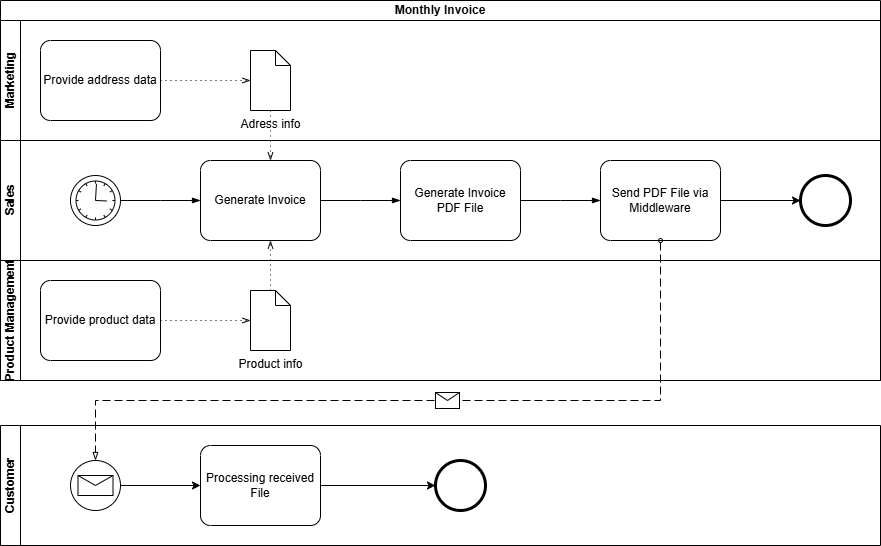
BPMN is a standard for modelling business processes.
Advantages
- Using pools and lanes, participants in the information flow can be represented in a structured and clear manner. Even more complex information flows with, for example, multiple recipients, can be easily implemented.
- Using event messages, intervals or temporal execution points can be clearly depicted.
- A BPMN model is also machine-readable or executable via a BPM engine.
Disadvantages
- To represent the infrastructure and architecture surrounding the information flow, BPMN lacks the necessary specific representation elements.
Conclusion and Personal Recommendation
All three notations – UML sequence diagrams, BPMN, and ArchiMate – offer valuable approaches for modeling information flows and architectures. However, from my perspective, ArchiMate stands out: It is the most versatile language and particularly suitable for mapping the interplay of architectural layers in EAM – from strategy through business processes to technology.
ArchiMate enables the representation of not only sequence flows or processes (albeit not as detailed as UML or BPMN), but above all architectural dependencies and relationships. This holistic view is crucial for understanding and managing complex enterprise architectures. While BPMN and UML sequence diagrams are superior in their specialized areas – processes and interactions, respectively – ArchiMate offers the necessary flexibility to map all layers with a single notation.
My Recommendation:
- For organizations with limited resources (e.g., small or medium-sized organizations), ArchiMate is the most pragmatic choice, as it covers most requirements without relying on multiple notations.
- If capacities are available, a specialized use of the languages is worthwhile: BPMN for detailed process modeling, UML sequence diagrams for technical interactions, and ArchiMate as an overarching framework that brings everything together.
Thus, ArchiMate is not just a notation, but a key tool for mastering the complexity of modern enterprise architectures – without losing track of the big picture.